OverviewHistoryStatsSecurity
npx skills add ...
Documentation
SKILL.md
npx skills add neolabhq/context-engineering-kit --skill apply-anthropic-skill-best-practices
Comprehensive guide for skill development based on Anthropic's official best practices - use for complex skills requiring detailed structure
npx skills add neolabhq/context-engineering-kit --skill apply-anthropic-skill-best-practices
Apply Anthropic's official skill authoring best practices to your skill.
Good Skills are concise, well-structured, and tested with real usage. This guide provides practical authoring decisions to help you write Skills that Claude can discover and use effectively.
Not every token in your Skill has an immediate cost. At startup, only the metadata (name and description) from all Skills is pre-loaded. Claude reads SKILL.md only when the Skill becomes relevant, and reads additional files only as needed. However, being concise in SKILL.md still matters: once Claude loads it, every token competes with conversation history and other context.
Skills act as additions to models, so effectiveness depends on the underlying model. Test your Skill with all the models you plan to use it with.
Testing considerations by model:
What works perfectly for Opus might need more detail for Haiku. If you plan to use your Skill across multiple models, aim for instructions that work well with all of them.
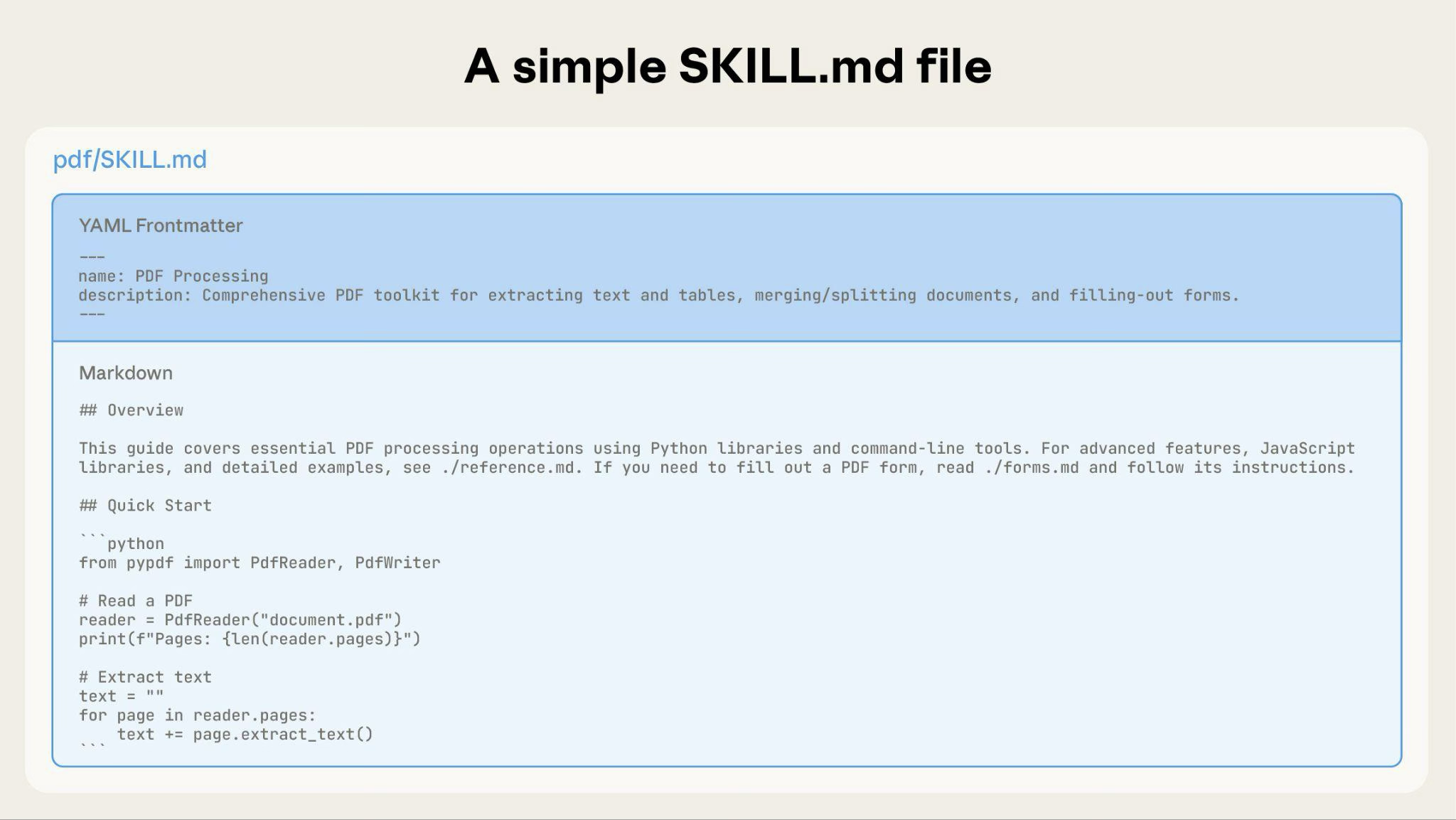
name - Human-readable name of the Skill (64 characters maximum)
description - One-line description of what the Skill does and when to use it (1024 characters maximum)
For complete Skill structure details, see the Skills overview.
Use consistent naming patterns to make Skills easier to reference and discuss. We recommend using gerund form (verb + -ing) for Skill names, as this clearly describes the activity or capability the Skill provides.
Good naming examples (gerund form):
Acceptable alternatives:
Avoid:
Consistent naming makes it easier to:
The description field enables Skill discovery and should include both what the Skill does and when to use it.
Be specific and include key terms. Include both what the Skill does and specific triggers/contexts for when to use it.
Each Skill has exactly one description field. The description is critical for skill selection: Claude uses it to choose the right Skill from potentially 100+ available Skills. Your description must provide enough detail for Claude to know when to select this Skill, while the rest of SKILL.md provides the implementation details.
Effective examples:
PDF Processing skill:
Excel Analysis skill:
Git Commit Helper skill:
Avoid vague descriptions like these:
SKILL.md serves as an overview that points Claude to detailed materials as needed, like a table of contents in an onboarding guide. For an explanation of how progressive disclosure works, see How Skills work in the overview.
Practical guidance:
A basic Skill starts with just a SKILL.md file containing metadata and instructions:
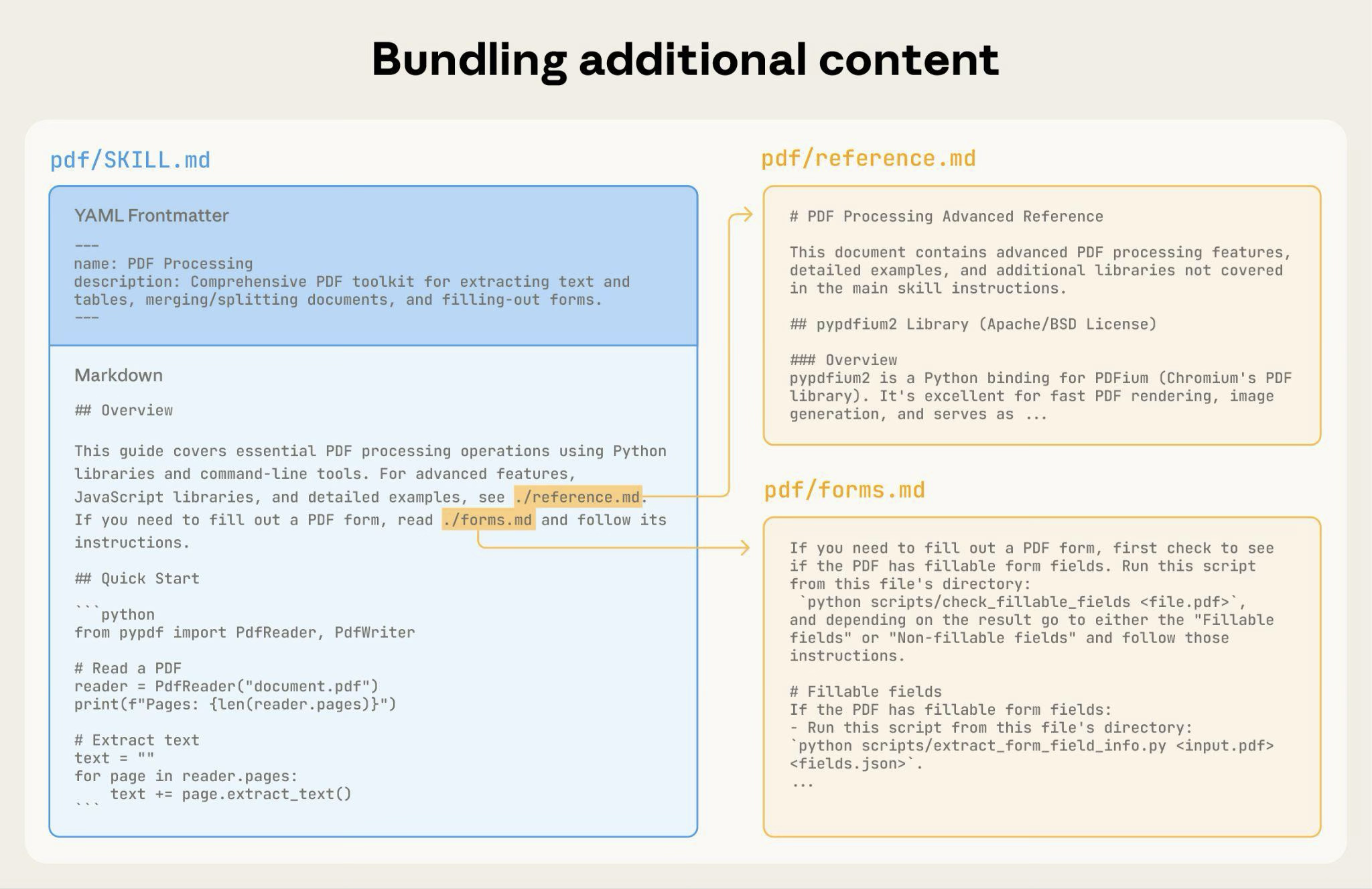
As your Skill grows, you can bundle additional content that Claude loads only when needed:
The complete Skill directory structure might look like this:
Claude loads FORMS.md, REFERENCE.md, or EXAMPLES.md only when needed.
For Skills with multiple domains, organize content by domain to avoid loading irrelevant context. When a user asks about sales metrics, Claude only needs to read sales-related schemas, not finance or marketing data. This keeps token usage low and context focused.
Show basic content, link to advanced content:
Claude reads REDLINING.md or OOXML.md only when the user needs those features.
Claude may partially read files when they're referenced from other referenced files. When encountering nested references, Claude might use commands like head -100 to preview content rather than reading entire files, resulting in incomplete information.
Keep references one level deep from SKILL.md. All reference files should link directly from SKILL.md to ensure Claude reads complete files when needed.
Bad example: Too deep:
Good example: One level deep:
For reference files longer than 100 lines, include a table of contents at the top. This ensures Claude can see the full scope of available information even when previewing with partial reads.
Example:
Claude can then read the complete file or jump to specific sections as needed.
For details on how this filesystem-based architecture enables progressive disclosure, see the Runtime environment section in the Advanced section below.
Break complex operations into clear, sequential steps. For particularly complex workflows, provide a checklist that Claude can copy into its response and check off as it progresses.
Example 1: Research synthesis workflow (for Skills without code):
This example shows how workflows apply to analysis tasks that don't require code. The checklist pattern works for any complex, multi-step process.
Example 2: PDF form filling workflow (for Skills with code):
Clear steps prevent Claude from skipping critical validation. The checklist helps both Claude and you track progress through multi-step workflows.
Common pattern: Run validator → fix errors → repeat
This pattern greatly improves output quality.
Example 1: Style guide compliance (for Skills without code):
This shows the validation loop pattern using reference documents instead of scripts. The "validator" is STYLE_GUIDE.md, and Claude performs the check by reading and comparing.
Example 2: Document editing process (for Skills with code):
The validation loop catches errors early.
Don't include information that will become outdated:
Bad example: Time-sensitive (will become wrong):
Good example (use "old patterns" section):
The old patterns section provides historical context without cluttering the main content.
Choose one term and use it throughout the Skill:
Good - Consistent:
Bad - Inconsistent:
Consistency helps Claude understand and follow instructions.
Provide templates for output format. Match the level of strictness to your needs.
For strict requirements (like API responses or data formats):
For flexible guidance (when adaptation is useful):
For Skills where output quality depends on seeing examples, provide input/output pairs just like in regular prompting:
Examples help Claude understand the desired style and level of detail more clearly than descriptions alone.
Guide Claude through decision points:
Create evaluations BEFORE writing extensive documentation. This ensures your Skill solves real problems rather than documenting imagined ones.
Evaluation-driven development:
This approach ensures you're solving actual problems rather than anticipating requirements that may never materialize.
Evaluation structure:
The most effective Skill development process involves Claude itself. Work with one instance of Claude ("Claude A") to create a Skill that will be used by other instances ("Claude B"). Claude A helps you design and refine instructions, while Claude B tests them in real tasks. This works because Claude models understand both how to write effective agent instructions and what information agents need.
Creating a new Skill:
Complete a task without a Skill: Work through a problem with Claude A using normal prompting. As you work, you'll naturally provide context, explain preferences, and share procedural knowledge. Notice what information you repeatedly provide.
Identify the reusable pattern: After completing the task, identify what context you provided that would be useful for similar future tasks.
Example: If you worked through a BigQuery analysis, you might have provided table names, field definitions, filtering rules (like "always exclude test accounts"), and common query patterns.
Ask Claude A to create a Skill: "Create a Skill that captures this BigQuery analysis pattern we just used. Include the table schemas, naming conventions, and the rule about filtering test accounts."
Claude models understand the Skill format and structure natively. You don't need special system prompts or a "writing skills" skill to get Claude to help create Skills. Simply ask Claude to create a Skill and it will generate properly structured SKILL.md content with appropriate frontmatter and body content.Review for conciseness: Check that Claude A hasn't added unnecessary explanations. Ask: "Remove the explanation about what win rate means - Claude already knows that."
Improve information architecture: Ask Claude A to organize the content more effectively. For example: "Organize this so the table schema is in a separate reference file. We might add more tables later."
Test on similar tasks: Use the Skill with Claude B (a fresh instance with the Skill loaded) on related use cases. Observe whether Claude B finds the right information, applies rules correctly, and handles the task successfully.
Iterate based on observation: If Claude B struggles or misses something, return to Claude A with specifics: "When Claude used this Skill, it forgot to filter by date for Q4. Should we add a section about date filtering patterns?"
Iterating on existing Skills:
The same hierarchical pattern continues when improving Skills. You alternate between:
Use the Skill in real workflows: Give Claude B (with the Skill loaded) actual tasks, not test scenarios
Observe Claude B's behavior: Note where it struggles, succeeds, or makes unexpected choices
Example observation: "When I asked Claude B for a regional sales report, it wrote the query but forgot to filter out test accounts, even though the Skill mentions this rule."
Return to Claude A for improvements: Share the current SKILL.md and describe what you observed. Ask: "I noticed Claude B forgot to filter test accounts when I asked for a regional report. The Skill mentions filtering, but maybe it's not prominent enough?"
Review Claude A's suggestions: Claude A might suggest reorganizing to make rules more prominent, using stronger language like "MUST filter" instead of "always filter", or restructuring the workflow section.
Apply and test changes: Update the Skill with Claude A's refinements, then test again with Claude B on similar requests
Repeat based on usage: Continue this observe-refine-test cycle as you encounter new scenarios. Each iteration improves the Skill based on real agent behavior, not assumptions.
Gathering team feedback:
Why this approach works: Claude A understands agent needs, you provide domain expertise, Claude B reveals gaps through real usage, and iterative refinement improves Skills based on observed behavior rather than assumptions.
As you iterate on Skills, pay attention to how Claude actually uses them in practice. Watch for:
Iterate based on these observations rather than assumptions. The 'name' and 'description' in your Skill's metadata are particularly critical. Claude uses these when deciding whether to trigger the Skill in response to the current task. Make sure they clearly describe what the Skill does and when it should be used.
Always use forward slashes in file paths, even on Windows:
scripts/helper.py, reference/guide.mdscripts\helper.py, reference\guide.mdUnix-style paths work across all platforms, while Windows-style paths cause errors on Unix systems.
Don't present multiple approaches unless necessary:
The sections below focus on Skills that include executable scripts. If your Skill uses only markdown instructions, skip to Checklist for effective Skills.
When writing scripts for Skills, handle error conditions rather than punting to Claude.
Good example: Handle errors explicitly:
Bad example: Punt to Claude:
Configuration parameters should also be justified and documented to avoid "voodoo constants" (Ousterhout's law). If you don't know the right value, how will Claude determine it?
Good example: Self-documenting:
Bad example: Magic numbers:
Even if Claude could write a script, pre-made scripts offer advantages:
Benefits of utility scripts:
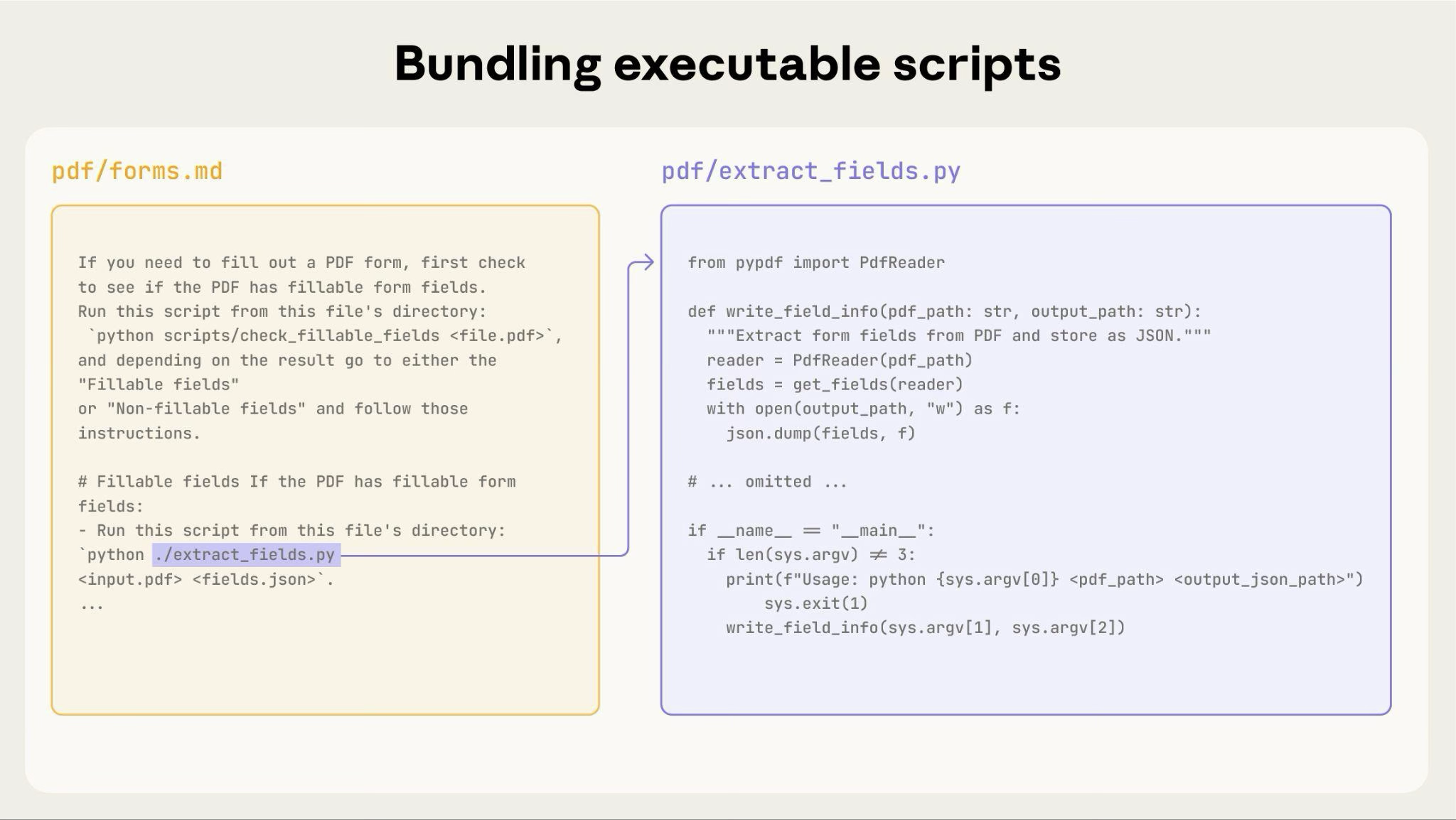
The diagram above shows how executable scripts work alongside instruction files. The instruction file (forms.md) references the script, and Claude can execute it without loading its contents into context.
Important distinction: Make clear in your instructions whether Claude should:
analyze_form.py to extract fields"analyze_form.py for the field extraction algorithm"For most utility scripts, execution is preferred because it's more reliable and efficient. See the Runtime environment section below for details on how script execution works.
Example:
When inputs can be rendered as images, have Claude analyze them:
Claude's vision capabilities help understand layouts and structures.
When Claude performs complex, open-ended tasks, it can make mistakes. The "plan-validate-execute" pattern catches errors early by having Claude first create a plan in a structured format, then validate that plan with a script before executing it.
Example: Imagine asking Claude to update 50 form fields in a PDF based on a spreadsheet. Without validation, Claude might reference non-existent fields, create conflicting values, miss required fields, or apply updates incorrectly.
Solution: Use the workflow pattern shown above (PDF form filling), but add an intermediate changes.json file that gets validated before applying changes. The workflow becomes: analyze → create plan file → validate plan → execute → verify.
Why this pattern works:
When to use: Batch operations, destructive changes, complex validation rules, high-stakes operations.
Implementation tip: Make validation scripts verbose with specific error messages like "Field 'signature_date' not found. Available fields: customer_name, order_total, signature_date_signed" to help Claude fix issues.
Skills run in the code execution environment with platform-specific limitations:
List required packages in your SKILL.md and verify they're available in the code execution tool documentation.
Skills run in a code execution environment with filesystem access, bash commands, and code execution capabilities. For the conceptual explanation of this architecture, see The Skills architecture in the overview.
How this affects your authoring:
How Claude accesses Skills:
reference/guide.md), not backslashesform_validation_rules.md, not doc2.mdreference/finance.md, reference/sales.mddocs/file1.md, docs/file2.mdvalidate_form.py rather than asking Claude to generate validation codeanalyze_form.py to extract fields" (execute)analyze_form.py for the extraction algorithm" (read as reference)Example:
When the user asks about revenue, Claude reads SKILL.md, sees the reference to reference/finance.md, and invokes bash to read just that file. The sales.md and product.md files remain on the filesystem, consuming zero context tokens until needed. This filesystem-based model is what enables progressive disclosure. Claude can navigate and selectively load exactly what each task requires.
For complete details on the technical architecture, see How Skills work in the Skills overview.
If your Skill uses MCP (Model Context Protocol) tools, always use fully qualified tool names to avoid "tool not found" errors.
Format: ServerName:tool_name
Example:
Where:
BigQuery and GitHub are MCP server namesbigquery_schema and create_issue are the tool names within those serversWithout the server prefix, Claude may fail to locate the tool, especially when multiple MCP servers are available.
Don't assume packages are available:
The SKILL.md frontmatter includes only name (64 characters max) and description (1024 characters max) fields. See the Skills overview for complete structure details.
Keep SKILL.md body under 500 lines for optimal performance. If your content exceeds this, split it into separate files using the progressive disclosure patterns described earlier. For architectural details, see the Skills overview.
Before sharing a Skill, verify:
bigquery-skill/
├── SKILL.md (overview, points to reference files)
└── reference/
    ├── finance.md (revenue metrics)
    ├── sales.md (pipeline data)
    └── product.md (usage analytics)